Digital transformation has changed the way businesses interact with customers. Today, organizations across retail, healthcare, education, hospitality, banking, and corporate sectors are adopting Touch Screen Kiosk solutions to deliver faster services, improve customer experiences, and streamline operations.
Whether it’s a self-service check-in system at a hospital, a digital directory in a shopping mall, or a visitor management kiosk in a corporate office, interactive kiosks have become an essential business tool.
What Is a Touch Screen Kiosk?
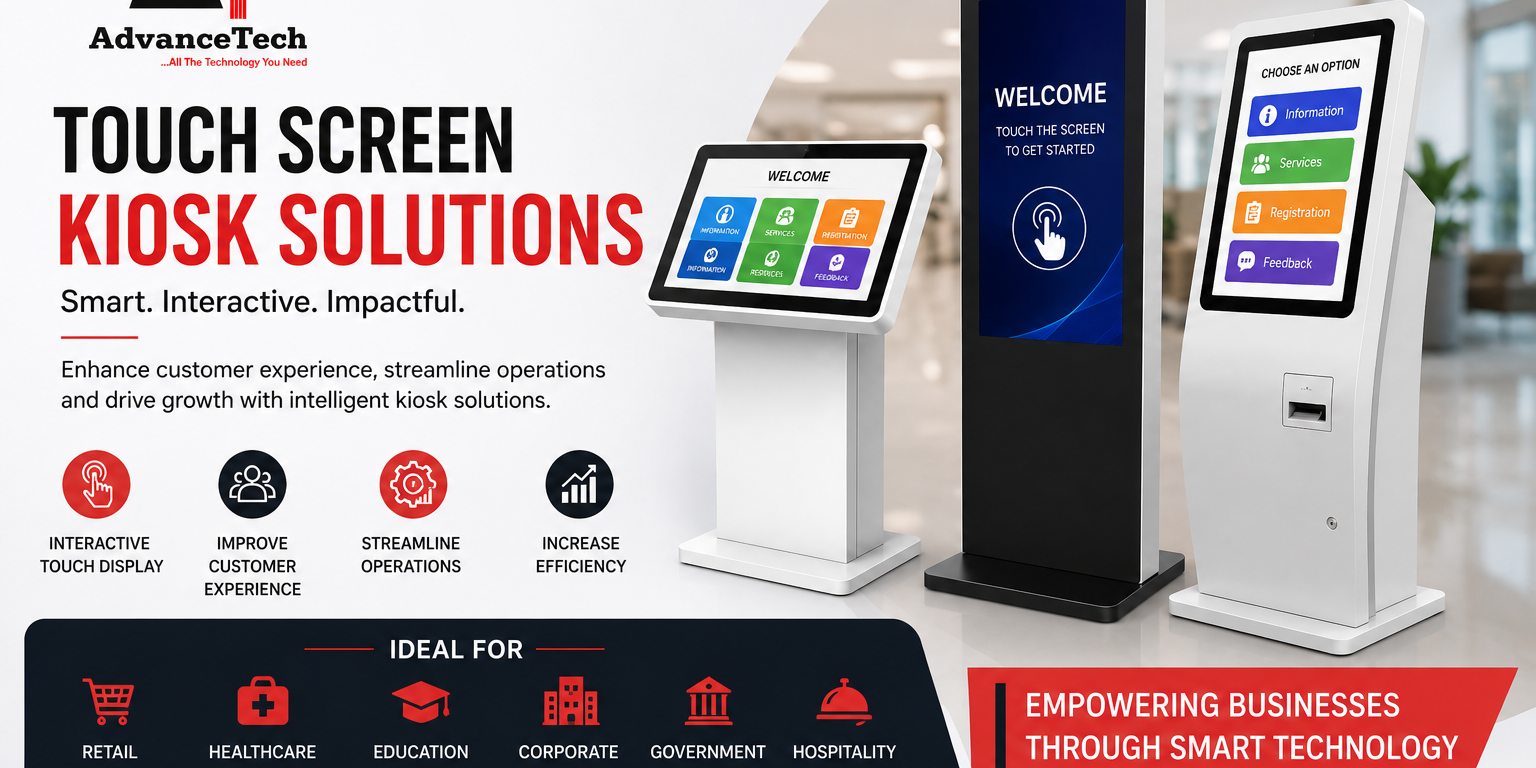
A Touch Screen Kiosk is an interactive digital terminal that allows users to access information, complete transactions, register visitors, browse products, or perform self-service tasks using an intuitive touch interface.
Unlike traditional customer service counters, kiosks operate independently, reducing waiting times while improving efficiency.
Modern kiosk systems may include:
- High-resolution touch displays
- QR and barcode scanners
- RFID readers
- Thermal receipt printers
- Payment terminals
- Facial recognition cameras
- Cloud-based management software
These features make kiosks highly adaptable for various industries.
Why Businesses Are Investing in Touch Screen Kiosks
Customer expectations continue to evolve. People now prefer fast, contactless, and self-service experiences.
Improved Customer Experience
Visitors can quickly access information without waiting for staff assistance, leading to higher customer satisfaction.
Increased Operational Efficiency
Routine tasks such as registrations, ticket generation, or information sharing can be automated, allowing employees to focus on higher-value activities.
Reduced Operational Costs
Although the initial investment may be higher than traditional systems, touch screen kiosks help reduce labor costs and improve productivity over time.
Better Brand Image
Modern interactive technology demonstrates innovation and professionalism, strengthening customer confidence in your business.
Common Applications of Touch Screen Kiosks
Retail Stores
Retailers use kiosks for:
- Product catalog browsing
- Self-checkout
- Loyalty program registration
- Promotional campaigns
Healthcare Facilities
Hospitals and clinics implement kiosks for:
- Patient registration
- Appointment booking
- Queue management
- Digital wayfinding
Educational Institutions
Schools, colleges, and universities use kiosks to provide:
- Campus navigation
- Student information
- Attendance systems
- Event registration
Corporate Offices
Businesses improve visitor experiences through:
- Visitor management
- Employee attendance
- Meeting room booking
- Company directories
Government & Public Services
Government departments deploy kiosks for:
- Citizen information
- Document submission
- Bill payments
- Public service applications
Touch Screen Kiosk Comparison
Choosing the right digital solution often requires comparing available technologies.
| Feature | Touch Screen Kiosk | Information Desk | Mobile App |
| Self-Service | ✅ Yes | ❌ No | ✅ Yes |
| 24/7 Availability | ✅ Yes | ❌ Limited | ✅ Yes |
| Human Assistance | Limited | Full | None |
| Installation Cost | Medium | High | Medium |
| Customer Engagement | Excellent | Good | Good |
| On-site Accessibility | Excellent | Excellent | Depends on user device |
Which Option Is Better?
For organizations handling frequent customer interactions, Touch Screen Kiosks provide the best balance between efficiency, accessibility, and long-term cost savings.
How to Choose the Right Touch Screen Kiosk
Selecting the right kiosk depends on your business objectives.
Identify Your Use Case
Ask yourself:
- Information kiosk?
- Self-ordering system?
- Visitor management?
- Digital directory?
- Payment kiosk?
Understanding your goals ensures the right hardware and software selection.
Choose the Appropriate Screen Size
Smaller kiosks work well in offices, while larger displays are ideal for shopping malls, airports, and exhibitions.
Consider Software Integration
The kiosk should integrate seamlessly with:
- CRM software
- ERP systems
- Payment gateways
- Visitor management software
- Digital signage platforms
Evaluate Build Quality
Commercial-grade kiosks are designed for continuous operation and offer better durability than consumer-grade displays.
Actionable Tips Before Buying
Before investing in a Touch Screen Kiosk, follow these recommendations:
Assess Foot Traffic
Install kiosks in high-visibility locations where customers naturally gather.
Focus on User Experience
Simple navigation and responsive touch controls improve adoption rates.
Think About Future Expansion
Choose scalable systems that allow software updates and hardware upgrades.
Prioritize Security
Look for secure operating systems, encrypted data transmission, and remote management capabilities.
Partner with Experienced Providers
Professional consultation, installation, and after-sales support are critical for long-term success.
Frequently Asked Questions
What industries use Touch Screen Kiosks?
Retail, healthcare, education, hospitality, banking, transportation, government offices, and corporate businesses all benefit from kiosk technology.
Are Touch Screen Kiosks customizable?
Yes. Businesses can customize hardware, software, branding, screen size, and functionality according to operational requirements.
Do kiosks require internet connectivity?
Some applications work offline, while cloud-based systems require internet access for real-time data synchronization and remote management.
How long do Touch Screen Kiosks last?
Commercial-grade kiosks typically offer years of reliable performance when maintained properly.
Final Thoughts
A Touch Screen Kiosk is more than just a digital display—it is a smart business solution that enhances customer engagement, automates repetitive tasks, and improves operational efficiency. Whether you’re upgrading your retail store, healthcare facility, educational institution, or corporate office, investing in the right kiosk solution can deliver measurable long-term benefits.
Choosing a trusted technology partner ensures that your kiosk system is designed, installed, and supported to meet your organization’s unique requirements.